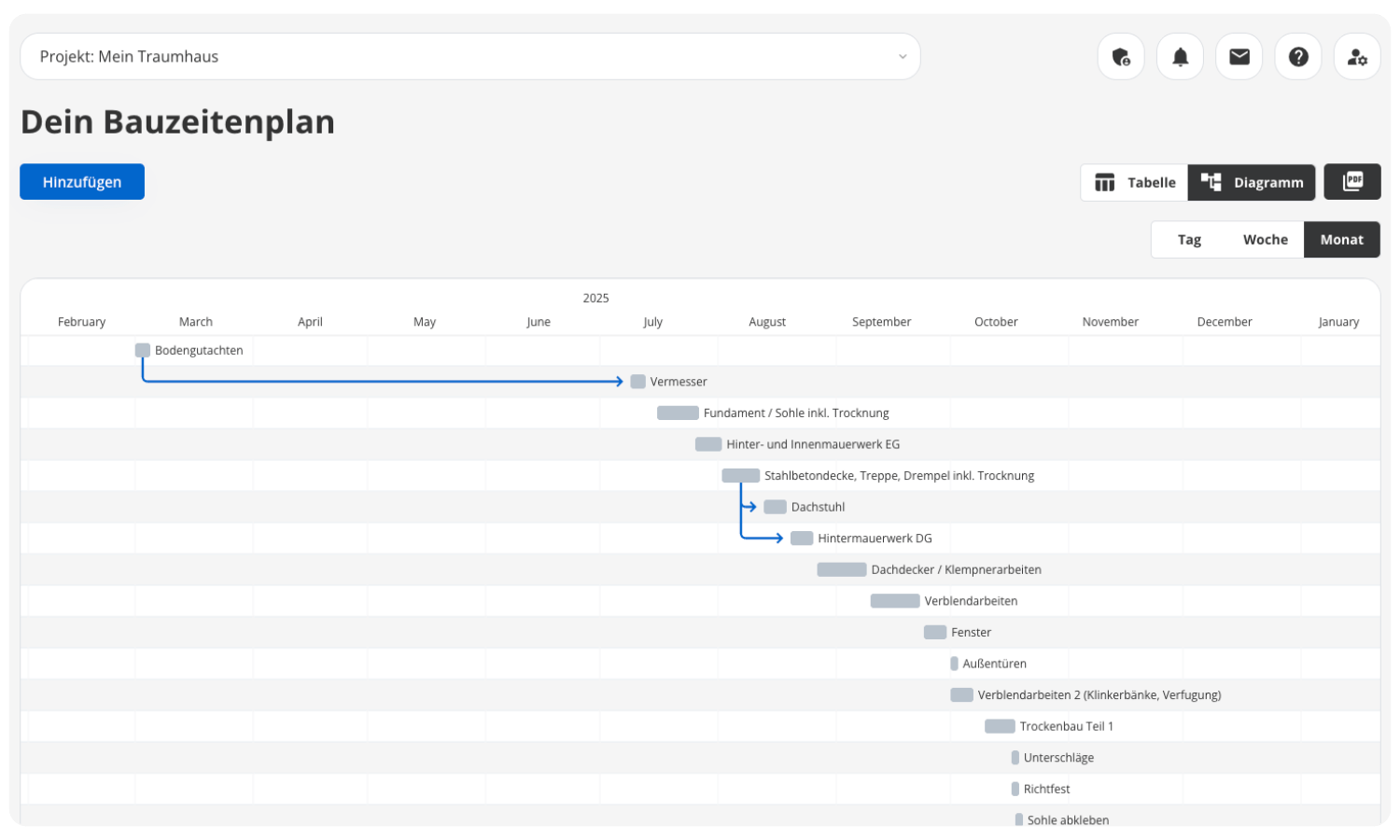
Without a schedule, any construction project will run into trouble
Construction Schedule Software for Your Construction Project
Delays cost money and cause stress. With the POCASIO construction schedule, you’ll always know who’s doing what and when, spot bottlenecks immediately, and keep your project on track—no matter how many trades are involved.



Without a clear timeline, your construction project can quickly descend into chaos
When building a house, deadlines, trades, and tasks are closely intertwined. If one step is delayed, the entire schedule often gets pushed back—and in the end, you pay the price in time, money, and stress. Many homeowners underestimate how important a structured construction schedule is and don’t realize until it’s too late that without one, nothing runs smoothly.

Delays are piling up
If one trade starts later than planned, the entire construction project is delayed. Without a schedule, you won’t realize this domino effect until it’s already getting expensive.
Invisible Dependencies
When a deadline is pushed back, it’s often not immediately clear which trades are affected. Without clear dependencies, misunderstandings and unnecessary delays can quickly arise.
No one knows what’s going on or when
Without a clear schedule, everyone involved loses their bearings. This leads to misunderstandings, downtime, and unnecessary stress.Construction scheduling software that adjusts its calculations when something gets delayed
POCASIO’s construction schedule makes your workflows clear and transparent—either as a concise table or visually in a Gantt chart. Dependencies between tasks are automatically displayed, so you can immediately see which steps are affected and who you need to notify. This helps you stay in control of your project and avoid costly delays.
A reliable overview of all appointments
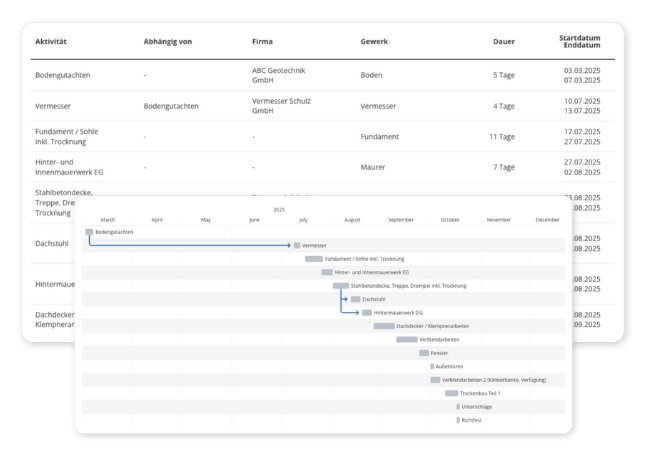
With the construction schedule, you’ll always know which contractor is coming, when they’ll arrive, how long they’ll take, and what needs to be done beforehand. You’ll see all activities listed by company, trade, duration, and start/end dates—all clearly laid out.
So you don’t have to juggle your project in your head—you can see exactly how it’s going, in black and white!

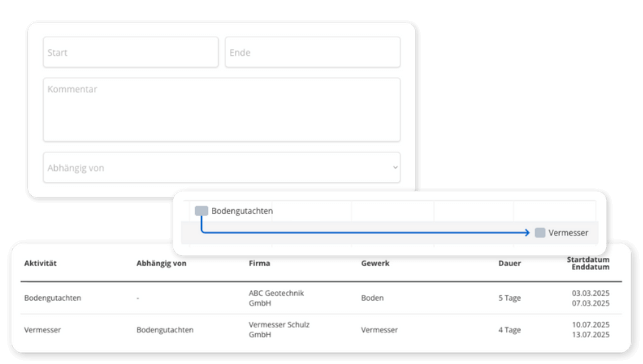
Define dependencies in the construction schedule and respond immediately
Many steps in the process build on one another: The roof truss can’t be installed until the ceiling has been poured. In POCASIO, you can clearly define these dependencies and immediately see when a delay causes the entire schedule to shift.
So that small delays don’t turn into big problems!
The choice is yours: as a table or as a Gantt chart
Whether you prefer to plan using a list or view the schedule as a timeline, POCASIO offers both views—and you can switch between them at any time. Especially helpful: The Gantt chart view shows you dependencies and buffer times at a glance.
So you can identify where bottlenecks occur and take action in time!
But that’s not all!
In addition to these features, POCASIO’s construction schedule offers many other extras that make your day-to-day work on the job site easier. From assigning companies and trades to flexibly customizable deadlines and automatically updated dependencies—you’ll always have everything under control. With progress tracking and mobile access, you’ll know exactly how far along your project is and stay in control even when you’re on the go.
List trades and companies
Assign each activity to a company and a trade. This way, you can see exactly who is on the job and when, and keep track of everything even when there are many people involved.Define dependencies with a single click
Establish logical connections between tasks, such as “Surveying → Foundation” or “Ceiling → Roof Truss.” POCASIO visually represents these dependencies.Construction Schedule to Print and Post
Export the table as a PDF and the Gantt chart as an image. That way, you can post the current status right on the construction site instead of having to explain it ten times over the phone.
Automatically Move Dependencies
If you reschedule an appointment or adjust the end date, POCASIO will, if desired, adjust all dependent follow-up tasks if doing so would otherwise result in overlaps.Remembering Important Milestones
Set up automatic reminders for key milestones such as the structural inspection, the drying of the concrete slab, or the key handover. That way, you won’t miss any critical deadlines.Construction Schedule App for iOS and Android
Check at the construction site to see which trade is up next, and reschedule the appointment right there on the spot. The POCASIO app is available on the App Store and Google Play.3 Steps to Your Digital Construction Schedule
Enter all relevant tasks and assign them directly to the responsible companies or trades. That way, you’ll know right from the start who is on the job and when.
3 Steps to Your Digital Construction Schedule
Set start and end dates and define dependencies between tasks with just a few clicks. POCASIO immediately shows you how the tasks are connected.

3 Steps to Your Digital Construction Schedule
If a deadline changes, POCASIO will automatically adjust all dependent tasks upon request. With the Gantt chart and mobile access, you’ll stay on track at all times.


With POCASIO, you build according to plan—instead of falling into chaos
Without a clear construction schedule, processes get mixed up, dependencies go unnoticed, and delays cost you time and money. POCASIO makes every step transparent and ensures that you have your deadlines firmly under control.
POCASIO in Comparison

e.g. Excel

House Construction Manager
Different Views (Table + Gantt)
Export as PDF (table) and PNG (Gantt chart)
Highlighting Dependencies Between Tasks
Automatic Rescheduling of Dependent Tasks
Assign Companies & Trades Directly
Flexibly adjust start and end dates
Share a project with a partner and have shared access
Many other features, such as budget planning, a construction log, checklists, a construction guide, and much more, make it the perfect companion for your construction project
Thousands of users. A tool for every construction project.
Whether it’s a single-family or semi-detached house, an apartment building or residential building, a single apartment, hotel, or restaurant: POCASIO helps to implement construction and renovation projects in a less stressful, clearer, and more cost-effective manner.









Start your Own Construction Project for Free Now.
With POCASIO, you can organize your construction or renovation project in one place and always have all the information in your pocket!
Frequently Asked Questions
Here you’ll find out what other builders, renovators, and project managers wanted to know before getting started with POCASIO.
In practice, both terms mean the same thing: the chronological sequence of all trades on your construction site. “Construction sequence plan” emphasizes the sequence, while “construction schedule” emphasizes the deadlines. In POCASIO, you can plan both in the same view.
Yes. You can set the start and end dates for each task individually and change them at any time if needed. POCASIO immediately shows you which follow-up tasks are affected.
Yes. When you define dependencies between tasks, POCASIO automatically reschedules the subsequent tasks as needed to prevent overlaps.
Yes. Every task can be assigned to a company and a trade. This way, you can see exactly who is on the job and when, and you can keep track of everything even when there are many people involved.
Yes. With just one click, you can export the content as a clear, easy-to-read PDF. That way, you’ll always have your data at your fingertips—to save, print, or share with others.
POCASIO offers a free basic version that works great during the planning phase. Once your construction phase begins and you want to track payments, for example, you can do so with the Plus license. The good news is that, thanks to the free license, you’ll know by then whether POCASIO is the right solution to support you through the end of your project.
POCASIO Plus is available as a monthly or annual subscription. Alternatively, you can purchase a one-time license if you don’t want to make recurring subscription payments. You can find the current prices on our Pricing page.
Yes. POCASIO is available as an app for iOS and Android in the App Store and on Google Play. On the construction site, you can see which trade is up next and reschedule an appointment right there, instead of having to remember it until the evening.
Strictly speaking, no. The developer will regularly provide you with a schedule, usually as an Excel file. It’s worth creating your own schedule if you also have other things to coordinate that aren’t included in the developer’s schedule: work you’re doing yourself, appointments with your own contractors, or simply the move. If none of that applies to you, the developer’s schedule is sufficient.
There isn’t a separate access option for tradespeople. However, you can export the schedule: the table as a PDF, and the Gantt chart as a PNG. Both can be printed out and posted in the construction trailer or on the construction sign so everyone can see who’s working when.
Then simply try it out for free! And if it’s not for you, you can delete your account at any time via your profile settings. And perhaps you could even let us know what you felt was missing, so that we can make POCASIO even better!