Construction documentation
Keep Track of Every Single Room
Create a complete photo documentation of your construction project – structured by floor plan and room. This way, you can immediately find any picture later, whether it’s about the course of the electrical cables in the living room or the tile structure in the bathroom. And if you want, you can even link defects, to-dos and costs directly to the respective room.


Because the Pictures on your Phone Won’t be Enough Later
Many builders document their project – but chaotically. Thousands of photos on the phone, no system, no link to rooms or defects. When it matters, the crucial photo is nowhere to be found. With POCASIO, this won’t happen to you.

No idea where anything is anymore
“Somewhere I took a photo of the cables…” – Anyone who does not store their pictures in a structured way completely loses track after a few months.
2,000 pictures – but none helps
From the first sod to the last tile, thousands of photos quickly come together. If they are not sorted, this is of little help in proving or troubleshooting.
Defects, costs, to-dos: Everything separate
Photos, defect lists and cost entries are in different tools or folders. Connections are lost, and tracking becomes detective work.So that You Still Know Exactly What is behind Every Wall Years Later
With the construction documentation from POCASIO, you can visually accompany your construction project – room by room, directly on the digital floor plan. Upload photos and give them a description. This creates a chronology of each individual room and you can immediately find the picture with the installed electrical cables in the living room even years later. If desired, you can also link defects, to-dos or costs with rooms and thus build a complete project history.
Photo Documentation Directly on the Floor Plan
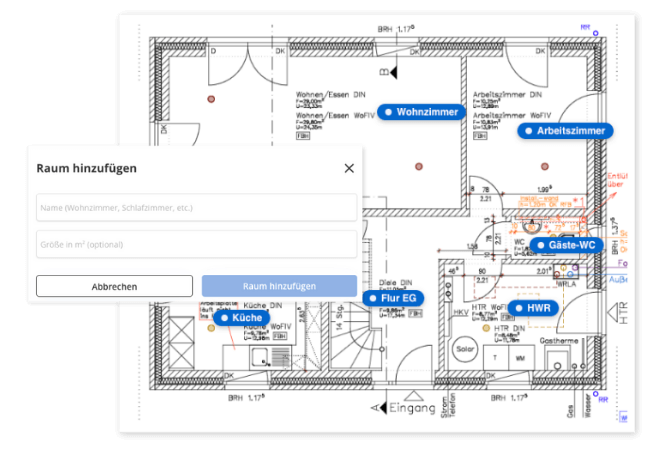
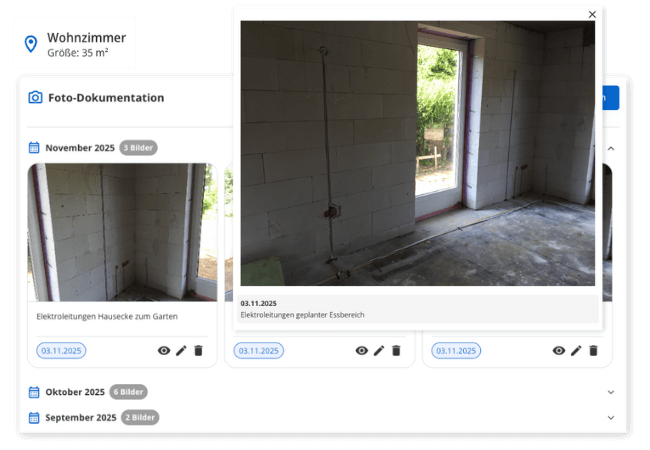
Upload your floor plans as a picture and create your rooms on them. Then you can upload photos in each room – including description and date. This creates a complete, visual development of your house from the first sod to the last coat of paint.
So that you record every construction progress – structured, comprehensible and findable at any time.
Find the Right Photo in Seconds
Instead of rummaging through thousands of pictures on your phone for the tenth time, in POCASIO you will find every photo exactly where it belongs: in the right room, at the right time. Whether you want to check how the cables were laid in the living room or how the pipes run behind the tiles in the bathroom – you can find it with just a few clicks.
So that you don’t have to search for a long time when it matters, but immediately have the right picture in front of you.
If You like: Defects, Costs and To-Dos Linked
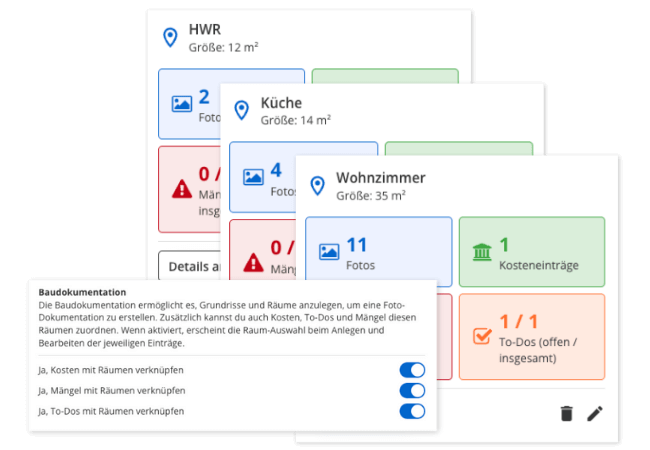
Would you like even more context? Then link additional information to the room if necessary – e.g. a to-do, a complaint or the associated cost item. Everything remains clearly stored in the room without you having to maintain information twice.
So that you can go deeper if necessary – without losing your project structure.
But That’s not all!
In addition to the chronological photo documentation, the construction documentation from POCASIO offers you many other helpers with which you can accompany your construction project in an even more structured and comprehensible way. Rooms can be filtered specifically, documents can be managed centrally and progress can even be recorded on the smartphone – directly on site. This makes your construction documentation not only complete, but also suitable for everyday use.
Manage multiple floor plans
Whether ground floor, upper floor or outdoor facilities: You can create any number of floor plans and easily switch between them.Room types for better orientation
Mark rooms as kitchen, bathroom, bedroom, technical room, etc. – so everything remains clearly assigned even with many entries.Date and description per photo
Store the recording date with each photo and – if you want – a description for later traceability.Linkage with other modules
If desired, you can link rooms with to-dos, defects and costs. Simply select the desired room when creating – without double maintenance.PDF export for each room
At the touch of a button, you get a complete chronology of the room – with all photos and assigned defects, costs and to-dos.Also mobile on the construction site
Whether on the construction site, during a telephone call with the craftsman or in the evening on the laptop – POCASIO works on all devices and is therefore the perfect companion for your project.In 3 steps to construction documentation
Upload your floor plans and digitally create the individual rooms. Give them names and areas – this creates the basis of your structured documentation.

In 3 steps to construction documentation
Record construction progress with your smartphone and assign the pictures directly to the appropriate room. You can also add a description.

In 3 steps to construction documentation
If you want, you can add more information: e.g. an open to-do, a complaint or a cost entry. Everything is neatly linked to the room – without double the effort.


With POCASIO You Document – Instead of Managing Chaos
Without structured documentation, important pictures quickly disappear, connections remain unclear and the overview of rooms, progress or problem areas is lost. POCASIO brings order to your project: With clearly assigned photos, rooms and additional information, you always know what happened where – even years later.
POCASIO in Comparison

e.g. mobile phone

House Construction Manager
Create and mark rooms directly in floor plans
Assign photos directly to individual rooms
Chronological photo documentation for each room
Add description and timestamp to pictures
Link rooms with costs, defects and to-dos
Share project with partner and have joint access
Many other functions such as budget planning, construction diary, checklists, construction process and much more to be the perfect companion for your construction project
Thousands of users. A tool for every construction project.
Whether it’s a single-family or semi-detached house, an apartment building or residential building, a single apartment, hotel, or restaurant: POCASIO helps to implement construction and renovation projects in a less stressful, clearer, and more cost-effective manner.

Start your Own Construction Project for Free Now.
With POCASIO, you can organize your construction or renovation project in one place and always have all the information in your pocket!
Frequently Asked Questions
Here you can find out what other builders, renovators and project managers wanted to know before starting with POCASIO.
POCASIO is a digital project management software especially for builders. It helps you to keep construction costs under control, to plan the construction process in a structured way and to organize all important documents and tasks centrally.
POCASIO is aimed at (private) builders who are building a new house or carrying out a major renovation. Regardless of whether you are building for the first time or already have experience – the solution gives you structure and security in every step.
Not at all. POCASIO is designed in such a way that even first-time builders can get started immediately without prior experience – with clear structures and simple tools.
You can easily upload your floor plans and create rooms on them with one click. As soon as a room is defined, you can upload photos there. The photo automatically gets the current date as a timestamp, which you can of course adjust.
Yes, you can assign existing photos to a room at any time – whether you took them directly on the construction site or found them later in your mobile phone memory. The chronological sorting is retained.
As many as you want. There is no limit, you can create a floor plan for each floor and also for the outdoor area and create any number of rooms. Each room has its own timeline, on which you can easily orient yourself.
Yes. With just one click, you can export the contents as a clear PDF. So you have your data at hand at any time – for saving, printing or passing on to third parties.
POCASIO has a free basic version that you can use to work great during the planning phase. When your construction phase begins and you want to record payments, for example, you can do this with the Plus license. The good thing: Thanks to the free license, you know at that time whether POCASIO is the right solution to accompany you until the end of your project.
POCASIO Plus is available as a monthly and annual subscription. Alternatively, you can also purchase a one-time license if you do not want to have ongoing subscription payments. You can find the current prices on our prices page.
Yes, of course! POCASIO is web-based and automatically adapts to the screen size of your laptop, tablet or smartphone. There are also apps for iOS and Android in the two app stores. So you have access to your project at any time, even on the construction site or on the go.
Yes, you can share your project with other people. For example, your construction partner, energy consultant, architect or your building expert can have access to the construction progress, documents and costs at any time – without cumbersome Excel lists and sending emails back and forth.
Then simply try it out for free! And if it’s not for you, you can delete your account at any time via your profile settings. And perhaps you could even let us know what you felt was missing, so that we can make POCASIO even better!