Construction Schedule
Without a Schedule, Every Construction Project Falters!
Delays cost money and nerves. With the POCASIO construction schedule, you always know who is doing what and when, you can immediately identify bottlenecks and keep your project on track – no matter how many trades are involved.


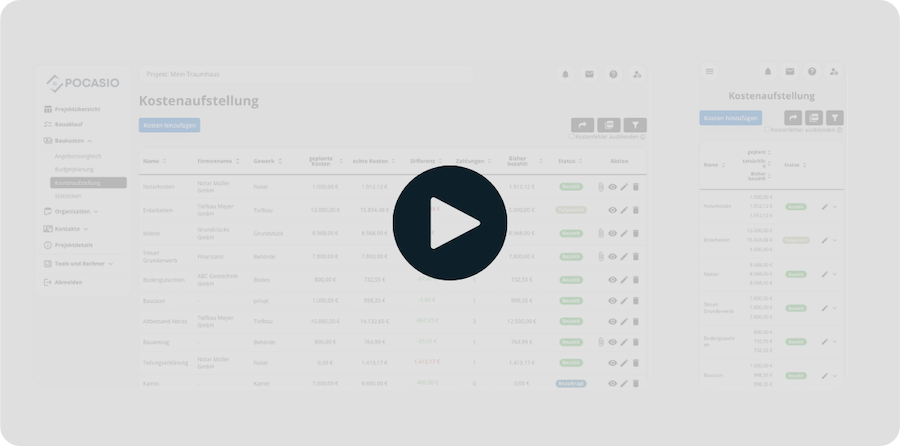
Without a Clear Schedule, your Construction Project Can Quickly Descend into Chaos
When building a house, deadlines, trades and tasks are closely linked. If one step is delayed, the entire process is often postponed – and in the end you pay with time, money and nerves. Many builders underestimate the importance of a structured construction schedule and realize too late that nothing runs smoothly without it.

Delays add up
If a trade starts later, the entire construction is pushed back. Without a schedule, you won’t recognize this chain reaction until it becomes expensive.
Dependencies invisible
If a deadline is postponed, it is often not immediately clear which trades are affected. Without clear dependencies, misunderstandings and unnecessary delays quickly arise.
Nobody knows what is when
Without clear scheduling, all parties lack orientation. This leads to misunderstandings, idle time and unnecessary stress.So that You Have Deadlines under Control – Even if Something is Postponed!
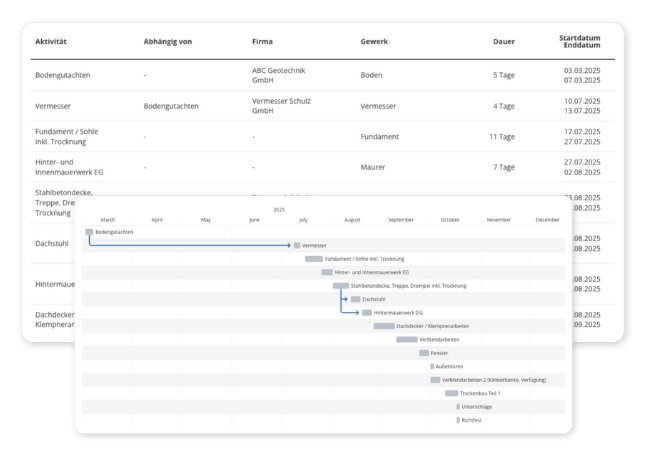
The construction schedule from POCASIO makes your processes clear and transparent – either as a clear table or visually in the Gantt chart. Dependencies between tasks are displayed automatically, so you can immediately see which steps are affected and who you need to inform. This way you keep control of your project and avoid expensive delays.
Reliable Overview of all Dates
With the construction schedule, you always know which craftsman is coming when, how long he needs and what needs to be done before. You can see all activities with company, trade, duration and start/end date – clearly displayed.
So that you don’t juggle your project in your head, but see in black and white how it’s going!

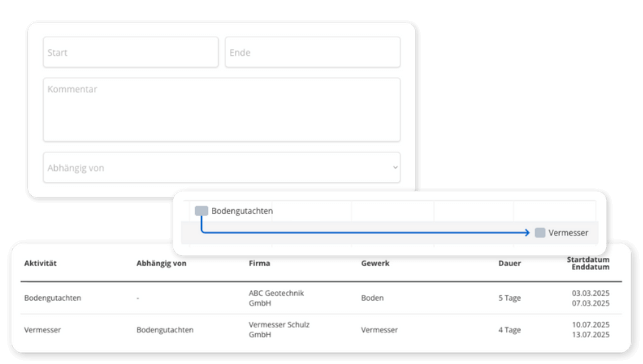
Represent and React to Dependencies
Many work steps build on each other: The roof truss can only be set when the ceiling is concreted. In POCASIO, you can clearly store such dependencies and immediately recognize when the entire process is shifted due to a delay.
So that small delays don’t become big problems!
The Choice is Yours: as a Table or rather in the Gantt Chart
Whether you prefer to plan in a list or have the process displayed as a timeline: POCASIO offers both views – switchable at any time. Particularly helpful: The Gantt view shows you connections and buffer times at a glance.
So that you can recognize where bottlenecks arise and react in time!
But That’s not all!
In addition to these functions, the POCASIO construction schedule offers you many other extras that make everyday life on the construction site easier. From the assignment of companies and trades to flexibly adaptable deadlines and automatically running dependencies – you always keep an overview. With progress display and mobile use, you know exactly how far your project is and always remain capable of acting on the go.
Deposit trades and companies
Assign each activity to a company and a trade. This way you can see exactly who is in action when and keep track of many participants.Define dependencies with a click
Establish logical connections between tasks, e.g. “Surveying → Foundation” or “Ceiling → Roof truss”. POCASIO visually represents the dependency.Flexibly adjust start and end dates
A deadline is postponed? No problem: With just a few clicks, you can adjust the duration or start date and immediately see which follow-up work is affected.Automatically move dependencies
If you postpone a deadline or adjust the end date, POCASIO will adjust all dependent follow-up work if desired, if there would otherwise be overlaps.Reminder of important milestones
Be automatically reminded of central dates such as shell acceptance, screed drying or key handover. This way you won’t miss any critical times.Also mobile on the construction site
Whether on the construction site, during a telephone call with the craftsman or in the evening on the laptop – POCASIO works on all devices and is therefore the perfect companion for your project.In 3 steps to an organized process
Enter all relevant tasks and assign them directly to the responsible companies or trades. This way you know from the beginning who is in action when.
In 3 steps to an organized process
Set start and end dates and define dependencies between the work steps with just a few clicks. POCASIO immediately shows you how the tasks are related.

In 3 steps to an organized process
If a deadline is postponed, POCASIO automatically adjusts all dependent tasks if desired. With Gantt chart and mobile use, you always stay on course.


With POCASIO You Build According to Plan – Instead of Slipping into Chaos
Without a clear construction schedule, processes get mixed up, dependencies remain undiscovered and delays cost you time and money. POCASIO makes all steps transparent and ensures that you have deadlines safely under control.
POCASIO in Comparison

e.g. Excel

House Construction Manager
Different views (table + Gantt)
Make dependencies between tasks visible
Automatic shifting of dependent tasks
Assign companies & trades directly
Flexibly adjust start and end dates
Share project with partner and have joint access
Many other functions such as budget planning, construction diary, checklists, construction process and much more to be the perfect companion for your construction project
Thousands of users. A tool for every construction project.
Whether it’s a single-family or semi-detached house, an apartment building or residential building, a single apartment, hotel, or restaurant: POCASIO helps to implement construction and renovation projects in a less stressful, clearer, and more cost-effective manner.

Start your Own Construction Project for Free Now.
With POCASIO, you can organize your construction or renovation project in one place and always have all the information in your pocket!
Frequently Asked Questions
Here you can find out what other builders, renovators and project managers wanted to know before starting with POCASIO.
POCASIO is a digital project management software especially for builders. It helps you to keep construction costs under control, to plan the construction process in a structured way and to organize all important documents and tasks centrally.
POCASIO is aimed at (private) builders who are building a new house or carrying out a major renovation. Regardless of whether you are building for the first time or already have experience – the solution gives you structure and security in every step.
Not at all. POCASIO is designed in such a way that even first-time builders can get started immediately without prior experience – with clear structures and simple tools.
Yes. You can individually set the start and end dates of each task and change them at any time if necessary. POCASIO immediately shows you which follow-up work is affected.
Yes. If you define dependencies between tasks, POCASIO automatically moves the follow-up tasks with you if desired, so that there are no overlaps.
Yes. Each task can be assigned to a company and a trade. This way you can see exactly who is in action when and keep track of many participants.
Yes. With just one click, you can export the contents as a clear PDF. So you have your data at hand at any time – for saving, printing or passing on to third parties.
POCASIO has a free basic version that you can use to work great during the planning phase. When your construction phase begins and you want to record payments, for example, you can do this with the Plus license. The good thing: Thanks to the free license, you know at that time whether POCASIO is the right solution to accompany you until the end of your project.
POCASIO Plus is available as a monthly and annual subscription. Alternatively, you can also purchase a one-time license if you do not want to have ongoing subscription payments. You can find the current prices on our prices page.
Yes, of course! POCASIO is web-based and automatically adapts to the screen size of your laptop, tablet or smartphone. There are also apps for iOS and Android in the two app stores. So you have access to your project at any time, even on the construction site or on the go.
Yes, you can share your project with other people. For example, your construction partner, energy consultant, architect or your building expert can have access to the construction progress, documents and costs at any time – without cumbersome Excel lists and sending emails back and forth.
Then simply try it out for free! And if it’s not for you, you can delete your account at any time via your profile settings. And perhaps you could even let us know what you felt was missing, so that we can make POCASIO even better!