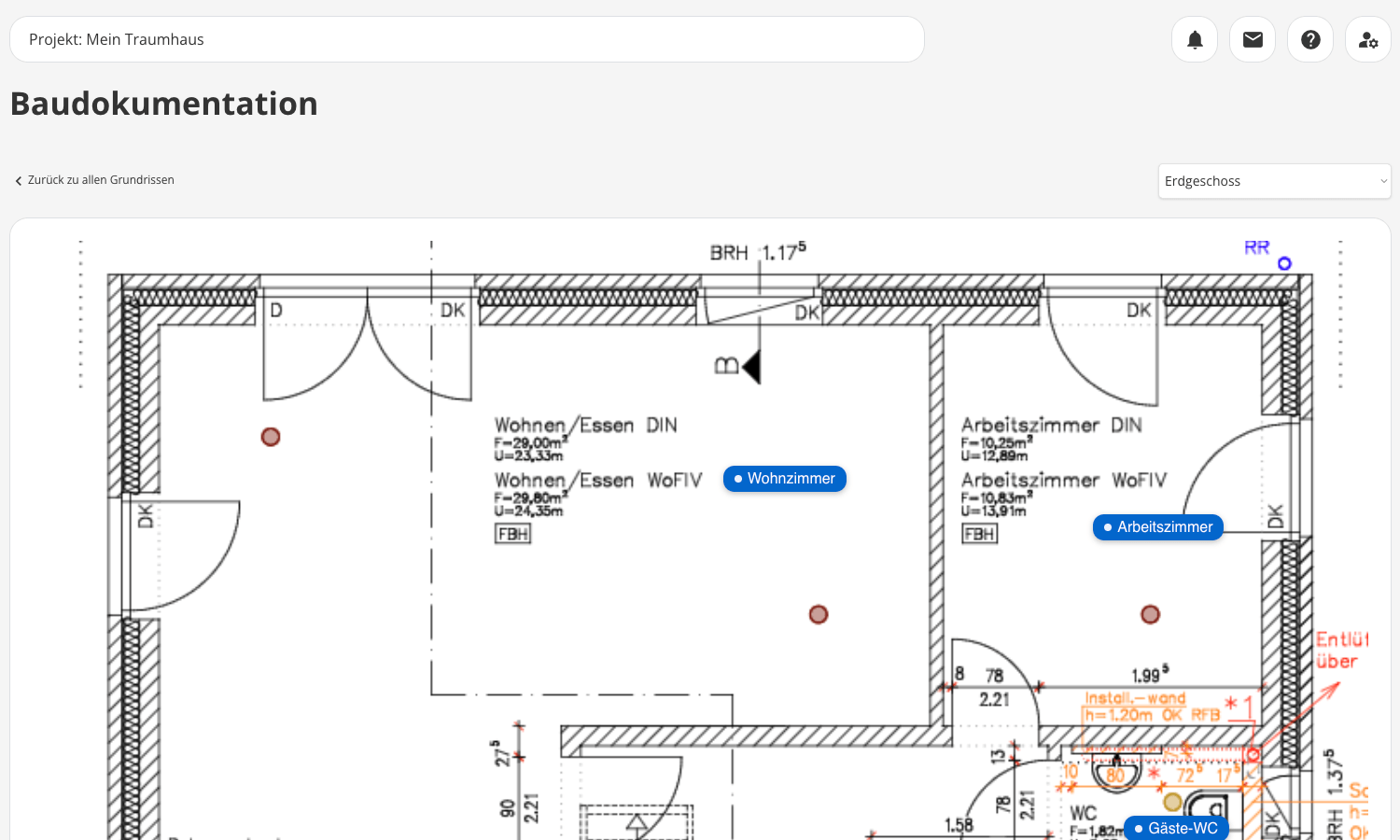
Construction Documentation
Keep track of every single room
Create a comprehensive photo documentation of your construction project—organized by floor plan and room. That way, you’ll be able to find any photo right away later on, whether it’s about the routing of the electrical wiring in the living room or the tile layout in the bathroom. And if you want, you can even link defects, to-dos, and costs directly to the respective room.



Because the photos on your cell phone won’t be enough later on
Many homeowners document their projects—but in a haphazard way. Thousands of photos on their phones, no system, and no way to link them to specific rooms or issues. When it really matters, that crucial photo is nowhere to be found. With POCASIO, that won’t happen to you.

I have no idea where anything is anymore
“I took a picture of the wires somewhere…” — If you don’t organize your photos systematically, you’ll completely lose track of them after a few months.
2,000 pictures—but none of them are helpful
From the groundbreaking to the final tile, you can quickly end up with thousands of photos. If they aren’t organized, they’re of little help when it comes to documentation or troubleshooting.
Issues, Costs, To-Do List: All Separately Listed
Photos, defect lists, and cost entries are scattered across various tools or folders. The big picture gets lost, and keeping track of everything turns into detective work.So that, even years later, you’ll still know exactly what’s behind every wall
With POCASIO’s construction documentation, you can visually track your construction project—room by room, right on the digital floor plan. Upload photos and add descriptions to them. This creates a timeline for each individual room, so even years later, you can instantly find the photo showing the electrical wiring installed in the living room. If you’d like, you can also link issues, to-dos, or costs to specific rooms, building a complete project history.
Photo documentation directly on the floor plan
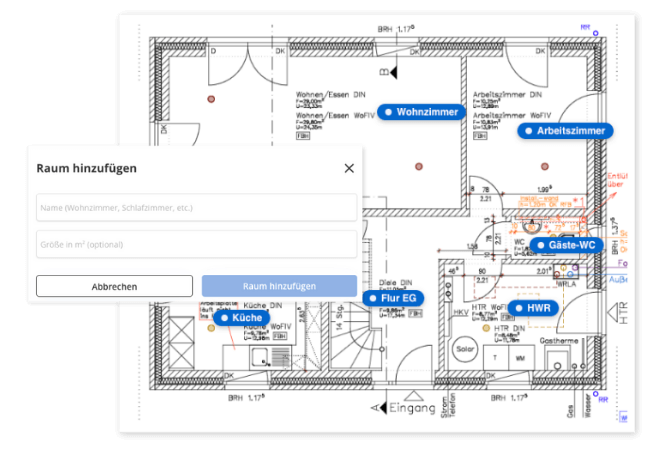
Upload your floor plans as images and create your rooms on them. Then you can upload photos for each room—along with a description and date. This creates a complete, visual record of your home’s development, from the first shovel in the ground to the final coat of paint.
So you can document every step of the construction process—in a structured, traceable way that’s easy to find at any time.
Find the right photo in seconds
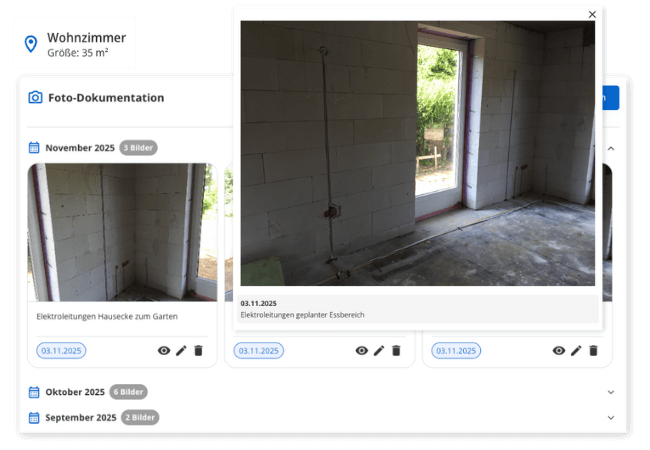
Instead of sifting through thousands of photos on your phone for the tenth time, POCASIO lets you find every photo exactly where it belongs: in the right room, at the right time. Whether you want to see how the wiring was run in the living room or how the pipes run behind the tiles in the bathroom—you’ll find it with just a few clicks.
So you don’t have to search for a long time when it counts, but instead have the right image right in front of you.
If you’d like: Link issues, costs, and to-dos
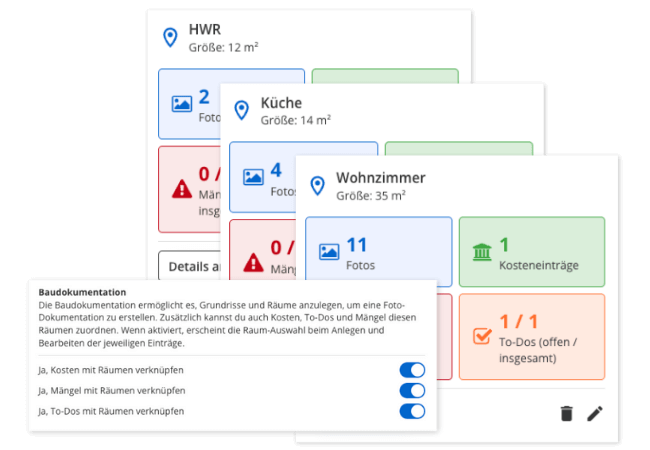
Want even more context? If needed, you can link additional information to the room—such as a to-do item, a complaint, or the associated cost item. Everything is neatly stored in the room without you having to enter the information twice.
So you can dive deeper when needed—without losing your project structure.
But that’s not all!
In addition to chronological photo documentation, POCASIO’s construction documentation offers many other tools that help you manage your construction project in an even more structured and transparent way. You can filter rooms by specific criteria, manage documents centrally, and even track progress on your smartphone—right on-site. This ensures your construction documentation is not only comprehensive but also practical for everyday use.
Manage Multiple Floor Plans
Whether it’s the ground floor, upper floor, or outdoor areas: You can create as many floor plans as you like and easily switch between them.Room Types for Better Orientation
Label rooms as kitchen, bathroom, bedroom, utility room, etc.—that way, everything stays clearly organized even with many entries.Date and description for each photo
For each photo, include the date it was taken and—if you’d like—a description so you can easily identify it later.Integration with Other Modules
If desired, you can link rooms to to-do items, defects, and costs. When creating an entry, simply select the desired room—without having to enter the information twice.PDF Export for Each Room
With the click of a button, you’ll get a complete timeline for the room—including all photos and associated issues, costs, and to-do items.Stay connected even when you’re on the job site
Whether you’re on a construction site, talking on the phone with a contractor, or working on your laptop in the evening—POCASIO works on all devices, making it the perfect companion for your project.Construction Documentation in 3 Steps
Upload your floor plans and create the individual rooms digitally. Give them names and specify their areas—this will form the basis of your structured documentation.

Construction Documentation in 3 Steps
Use your smartphone to take photos of your construction progress and assign the photos directly to the appropriate room. You can also add a description to each one.

Construction Documentation in 3 Steps
If you’d like, you can add more information: for example, an open to-do item, a complaint, or a cost entry. Everything is neatly linked to the room—without any extra work.


With POCASIO, you document—instead of managing chaos
Without structured documentation, important images can easily get lost, connections remain unclear, and it becomes difficult to keep track of rooms, progress, or problem areas. POCASIO brings order to your project: With clearly organized photos, rooms, and additional information, you’ll always know what happened where—even years later.
POCASIO in Comparison

e.g. mobile phone

House Construction Manager
Create and mark rooms directly on floor plans
Assign photos directly to individual rooms
Chronological Photo Documentation for Each Room
Add descriptions and timestamps to images
Link rooms to costs, issues, and to-do items
Share a project with a partner and have shared access
Many other features, such as budget planning, a construction log, checklists, a construction guide, and much more, make it the perfect companion for your construction project
Thousands of users. A tool for every construction project.
Whether it’s a single-family or semi-detached house, an apartment building or residential building, a single apartment, hotel, or restaurant: POCASIO helps to implement construction and renovation projects in a less stressful, clearer, and more cost-effective manner.









Start your Own Construction Project for Free Now.
With POCASIO, you can organize your construction or renovation project in one place and always have all the information in your pocket!
Frequently Asked Questions
Here you’ll find out what other builders, renovators, and project managers wanted to know before getting started with POCASIO.
POCASIO is digital project management software designed specifically for building owners. It helps you keep construction costs under control, plan the construction process in a structured way, and centrally organize all important documents and tasks.
POCASIO is designed for (private) homeowners who are building a new house or undertaking a major renovation. Whether this is your first time building or you already have experience, this solution provides you with structure and peace of mind every step of the way.
Not at all. POCASIO is designed so that even first-time builders with no prior experience can get started right away—with clear structures and simple tools.
You can easily upload your floor plans and create rooms on them with a single click. Once a room is defined, you can upload photos to it. The photo is automatically timestamped with the current date, which you can, of course, adjust.
Yes, you can assign existing photos to a room at any time—whether you took them directly at the construction site or found them later in your phone’s memory. The photos will remain sorted chronologically.
As many as you like. There’s no limit—you can create a floor plan for each floor and even for the outdoor area, and create as many rooms as you want. Each room has its own timeline, making it easy to navigate.
Yes. With just one click, you can export the content as a clear, easy-to-read PDF. That way, you’ll always have your data at your fingertips—to save, print, or share with others.
POCASIO offers a free basic version that works great during the planning phase. Once your construction phase begins and you want to track payments, for example, you can do so with the Plus license. The good news is that, thanks to the free license, you’ll know by then whether POCASIO is the right solution to support you through the end of your project.
POCASIO Plus is available as a monthly or annual subscription. Alternatively, you can purchase a one-time license if you don’t want to make recurring subscription payments. You can find the current prices on our Pricing page.
Yes, of course! POCASIO is web-based and automatically adjusts to the screen size of your laptop, tablet, or smartphone. There are also apps available for iOS and Android in both app stores. This means you can access your project at any time, even on a construction site or while on the go.
Yes, you can share your project with others. For example, your construction partner, energy consultant, architect, or building inspector can view the construction progress, documents, and costs at any time—without having to send cumbersome Excel spreadsheets and emails back and forth.
Then simply try it out for free! And if it’s not for you, you can delete your account at any time via your profile settings. And perhaps you could even let us know what you felt was missing, so that we can make POCASIO even better!