Construction Defects
Without Documentation, Defects Often Become your Responsibility
With POCASIO, you immediately record building errors with photos, notes, and dates. All defects are assigned to the responsible companies and exported as a notice of defects in PDF format at the touch of a button. This way, you transfer responsibility where it belongs.


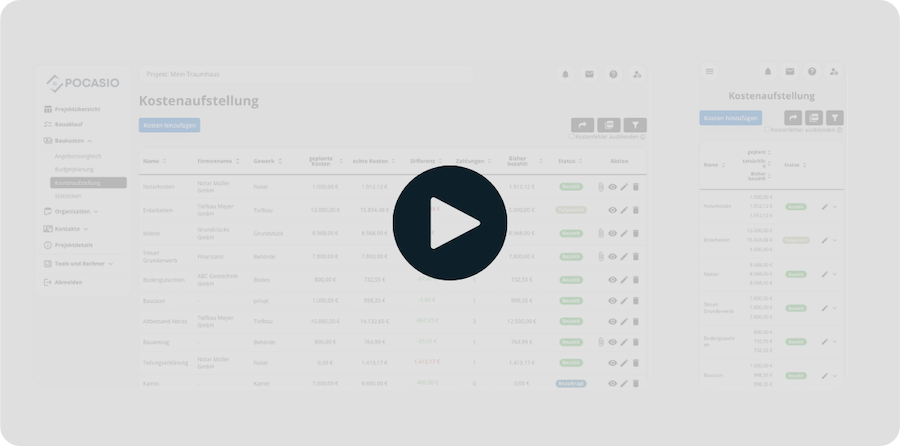
Unremedied Defects Ultimately Only Cost You Money
Defects occur on almost every construction site – from crookedly installed windows to untidy joints. However, many homeowners document these errors incompletely or not at all. Without clear evidence, it becomes difficult to hold companies accountable. Ultimately, you are left bearing the costs or must contend with endless discussions.

Defects go unnoticed
Small errors are often overlooked or not recorded. Later proving that the defect was present early on is then almost impossible. Or the defect is even forgotten.
No clear assignment
Without documentation, you no longer know which company is responsible for which building error and exactly when it occurred. This complicates clarification and delays rectification.
Missing Evidence
If a conflict arises, you lack conclusive evidence without complete records. Without proof, building errors often remain your problem and cost you money – not the company’s.So that You Comprehensively Document and Confidently Assert Defects
With POCASIO’s defect recording, you have all building errors under control. You record irregularities directly with photos, notes, and dates, assign them to the responsible companies, and can track their status at any time. If needed, you can create a notice of defects as a PDF with a single click and send it directly to the relevant company – consistently asserting your claims.
Record Construction Defects – with Deadline, Company, and Photos
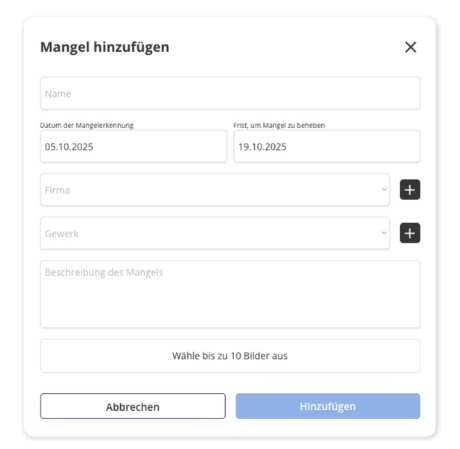
As soon as you notice a defect, you can document it directly in POCASIO: with a title, description, images, the affected trade, and a deadline for rectification.
So you don’t forget anything – and are on the safe side when it matters.
Notice of Defects as a PDF File at the Touch of a Button
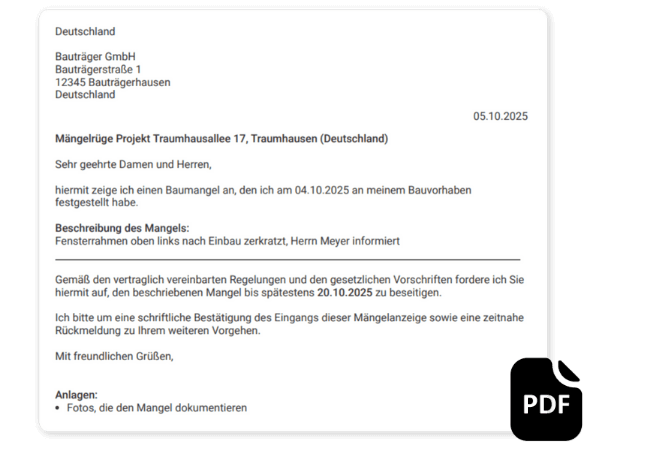
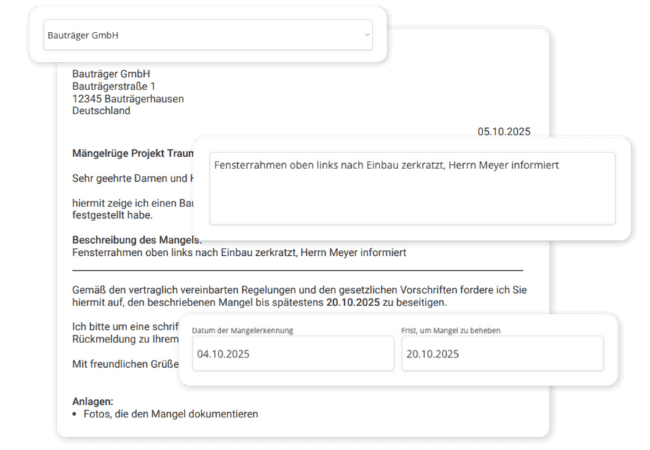
With one click, POCASIO creates a professionally formulated PDF document of your notice of defects – with all details, photos, and deadlines. Ideal for forwarding to the responsible company.
So you don’t have to search for templates first, and your concern reaches the right company.
All Outstanding Defects at a Glance
POCASIO clearly distinguishes between open and already rectified defects for you – so you never lose track and can trace every step.
So no defect is overlooked, and you don’t miss anything during acceptance.

But That’s not all!
In addition to quick recording and defect notices, POCASIO offers many other functions that simplify documentation for you. From multiple photos per defect to clear deadlines and status tracking – this ensures that no error is overlooked and all construction issues are consistently followed up.
Upload up to 10 images per defect
Document every defect with multiple photos from different perspectives – so nothing remains hidden.Date of Discovery and Deadline for Rectification
Specify when the defect was discovered and by when it must be rectified. This way, you can clearly demand remedial work.Company and Trade Directly Linked
Assign each building error to the responsible company and the affected trade – for clear responsibilities.Defect Status at a Glance
See immediately which defects are still outstanding and which are already resolved – with practical filter and search functions. This allows you to follow up directly with the responsible company.Nothing is lost – even after years
All defects remain permanently stored in your project – including a complete history of all defects. This way, you can always trace when you reported what to whom.Also mobile on the construction site
Whether on the construction site, during a telephone call with the craftsman or in the evening on the laptop – POCASIO works on all devices and is therefore the perfect companion for your project.3 Steps to a Rectified Construction Defect
Record the building error immediately with photos, notes, and dates. This ensures the condition is clearly documented and traceable at any time.

3 Steps to a Rectified Construction Defect
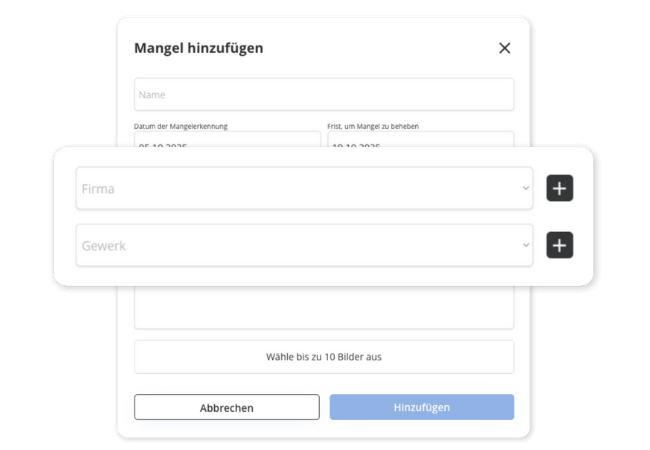
Assign the defect to the responsible company and the affected trade. This makes it clear from the start who needs to act.
3 Steps to a Rectified Construction Defect
If needed, create a notice of defects as a PDF with one click, which is automatically populated from your entries. This way, you consistently assert your claims.

Document Securely with POCASIO – Instead of Chasing after Building Errors
Without structured defect recording, building errors often remain undetected or unprovable. With POCASIO, you comprehensively document every defect, clearly assign it, and demand remedial work.
POCASIO in Comparison

e.g. Excel

House Construction Manager
Record Defects with Photos, Notes & Date
Clearly Assign Companies & Trades
Set Deadlines for Rectification
Filtered Status Overview (Open/Resolved)
Thanks to mobile optimization, all data is always available on the construction site as well.
Create defect notification as PDF
Share project with partner and have joint access
Many other functions such as construction schedule, construction diary, checklists, construction process and much more to be the perfect companion for your construction project
Thousands of users. A tool for every construction project.
Whether it’s a single-family or semi-detached house, an apartment building or residential building, a single apartment, hotel, or restaurant: POCASIO helps to implement construction and renovation projects in a less stressful, clearer, and more cost-effective manner.

Start your Own Construction Project for Free Now.
With POCASIO, you can organize your construction or renovation project in one place and always have all the information in your pocket!
Frequently Asked Questions
Here you can find out what other builders, renovators and project managers wanted to know before starting with POCASIO.
POCASIO is a digital project management software especially for builders. It helps you to keep construction costs under control, to plan the construction process in a structured way and to organize all important documents and tasks centrally.
POCASIO is aimed at (private) builders who are building a new house or carrying out a major renovation. Regardless of whether you are building for the first time or already have experience – the solution gives you structure and security in every step.
Not at all. POCASIO is designed in such a way that even first-time builders can get started immediately without prior experience – with clear structures and simple tools.
Simply: Create a new entry, add photos, notes, and the date, and assign the defect to the responsible company or trade.
Yes. You can add up to 10 photos per defect – ideal for documenting different perspectives or the progress of rectification.
Yes. You specify by when a defect must be rectified. By default, 14 days are selected, but you can freely adjust this. This way, you can make clear demands if the deadline is exceeded.
This way, you always know who is responsible for rectification. This ensures clarity and accelerates remedial work. Furthermore, the notice of defects is directly addressed to the responsible company.
All relevant information is automatically compiled and converted into a PDF with one click. You can then forward this document directly to the responsible company.
Yes. With just one click, you can export the contents as a clear PDF. So you have your data at hand at any time – for saving, printing or passing on to third parties.
POCASIO has a free basic version that you can use to work great during the planning phase. When your construction phase begins and you want to record payments, for example, you can do this with the Plus license. The good thing: Thanks to the free license, you know at that time whether POCASIO is the right solution to accompany you until the end of your project.
POCASIO Plus is available as a monthly and annual subscription. Alternatively, you can also purchase a one-time license if you do not want to have ongoing subscription payments. You can find the current prices on our prices page.
Yes, of course! POCASIO is web-based and automatically adapts to the screen size of your laptop, tablet or smartphone. There are also apps for iOS and Android in the two app stores. So you have access to your project at any time, even on the construction site or on the go.
Yes, you can share your project with other people. For example, your construction partner, energy consultant, architect or your building expert can have access to the construction progress, documents and costs at any time – without cumbersome Excel lists and sending emails back and forth.
Then simply try it out for free! And if it’s not for you, you can delete your account at any time via your profile settings. And perhaps you could even let us know what you felt was missing, so that we can make POCASIO even better!