Construction defects
Without documentation, you’re often left to deal with the problems yourself
With POCASIO, you can immediately document construction defects with photos, notes, and the date. All defects are assigned to the responsible companies—and exported as a defect report in PDF format with the click of a button. This way, you place the responsibility where it belongs.



In the end, unresolved issues will only cost you money
Defects occur on almost every construction site—from crooked windows to poorly finished joints. However, many homeowners document these defects incompletely or not at all. Without clear evidence, it becomes difficult to hold contractors accountable. In the end, you’re left footing the bill or have to fight your way through endless discussions.

Defects Go Unnoticed
Minor defects are often overlooked or not documented. It is then nearly impossible to prove later that the defect was present from the beginning. Or the defect may even be forgotten.
No clear classification
Without documentation, you won’t know which company is responsible for which construction defect or exactly when it occurred. This makes it harder to determine who is at fault and delays the repair.
Missing Evidence
If a dispute arises, you won’t have solid evidence without complete records. Without proof, construction defects often remain your problem and cost you money—not the company’s.So you can thoroughly document defects and successfully enforce your rights
With POCASIO’s defect tracking feature, you have all construction defects under control. You can document issues right away with photos, notes, and dates, assign them to the responsible companies, and track their status at any time. If needed, you can create a defect report as a PDF with a single click and send it directly to the relevant company—ensuring your claims are consistently enforced.
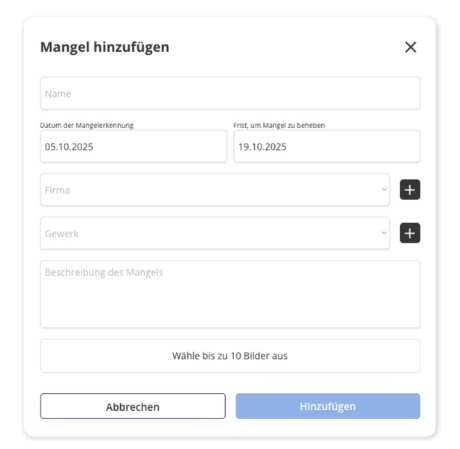
Report a construction defect—including the deadline, contractor, and photos
As soon as you notice a defect, you can document it directly in POCASIO: include a title, description, photos, the affected trade, and a deadline for rectification.
So you don’t forget anything—and so you’re on the safe side when it counts.
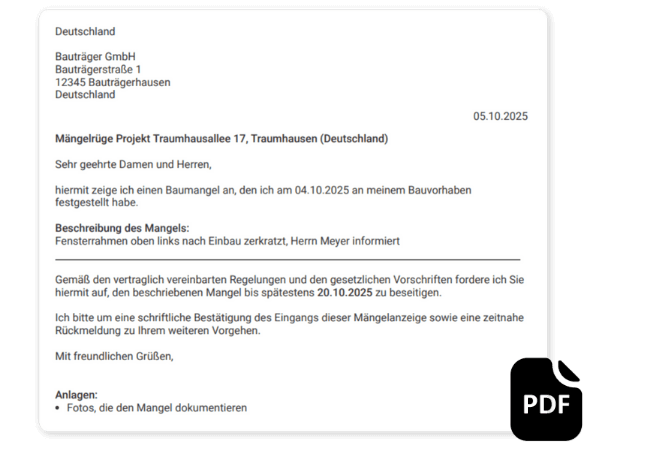
Submit a complaint as a PDF file with the click of a button
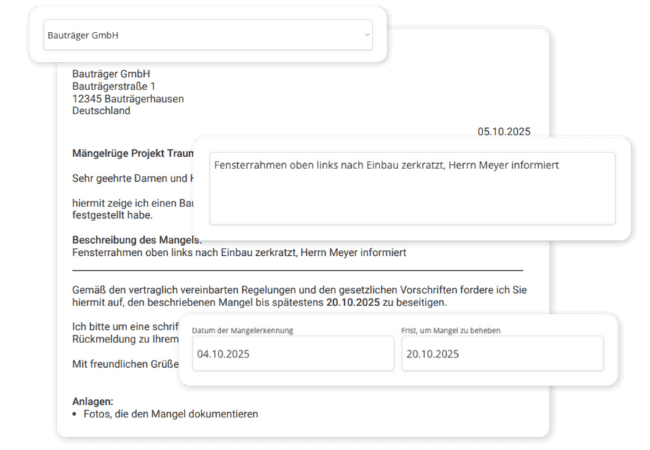
With just one click, POCASIO creates a professionally drafted PDF document of your complaint—complete with all details, photos, and deadlines. Ideal for forwarding to the relevant company.
So you don’t have to spend time looking for templates and can make sure your request goes to the right company.
An Overview of All Outstanding Defects
POCASIO clearly distinguishes between open and resolved issues for you—so you never lose track and can follow every step.
To ensure that no defect goes unnoticed and that you don’t overlook anything during the inspection.

But that’s not all!
In addition to quick issue reporting and defect notifications, POCASIO offers many other features that make documentation easier. From taking multiple photos per defect to setting clear deadlines and tracking status—this ensures that no issue is overlooked and that all construction problems are consistently tracked.
Upload up to 10 photos per defect
Document every defect with several photos taken from different angles—that way, nothing goes unnoticed.Date of Discovery and Deadline for Correction
Specify when the defect was discovered and by when it must be corrected. This will allow you to clearly demand that the defect be corrected.Company and Trade Directly Linked
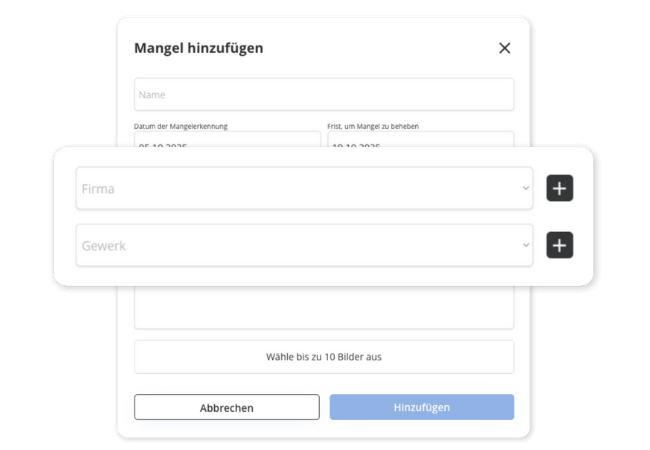
Assign each construction defect to the responsible company and the relevant trade—to ensure clear accountability.Defect Status at a Glance
See at a glance which issues are still open and which have already been resolved—with handy filter and search functions. This way, you can follow up directly with the company responsible.Nothing is lost—even years later
All defects are permanently stored in your project—including a complete history of all defects. This allows you to track at any time when you reported what to whom.Stay connected even when you’re on the job site
Whether you’re on a construction site, talking on the phone with a contractor, or working on your laptop in the evening—POCASIO works on all devices, making it the perfect companion for your project.3 Steps to Fixing a Construction Defect
Document the construction defect immediately with photos, notes, and the date. This ensures that the condition is clearly documented and can be traced at any time.

3 Steps to Fixing a Construction Defect
Assign the defect to the responsible company and the relevant trade. This makes it clear from the start who needs to take action.
3 Steps to Fixing a Construction Defect
If needed, create a notice of defect as a PDF with a single click—it will be automatically populated with your entries. This way, you can consistently enforce your claims.

Document with confidence using POCASIO—instead of chasing after construction defects
Without a structured defect tracking system, construction defects often go undetected or cannot be proven. With POCASIO, you can thoroughly document every defect, clearly categorize it, and request corrective action.
POCASIO in Comparison

e.g. Excel

House Construction Manager
Record defects with photos, notes, and dates
Clearly Categorize Companies and Trades
Set deadlines for resolution
Filtered Status Overview (Open/Completed)
Thanks to mobile optimization, you always have all your data with you—even on the construction site
Create a Notice of Defect as a PDF
Share a project with a partner and have shared access
Many other features, such as a construction schedule, construction log, checklists, construction guide, and much more, make it the perfect companion for your construction project
Thousands of users. A tool for every construction project.
Whether it’s a single-family or semi-detached house, an apartment building or residential building, a single apartment, hotel, or restaurant: POCASIO helps to implement construction and renovation projects in a less stressful, clearer, and more cost-effective manner.









Start your Own Construction Project for Free Now.
With POCASIO, you can organize your construction or renovation project in one place and always have all the information in your pocket!
Frequently Asked Questions
Here you’ll find out what other builders, renovators, and project managers wanted to know before getting started with POCASIO.
Simply: Create a new entry, add photos, notes, and the date, and assign the defect to the responsible company or trade.
Yes. You can add up to 10 photos per issue—which is ideal for documenting different perspectives or the progress of the repair.
Yes. You specify the deadline by which a deficiency must be corrected. The default is 14 days, but you can adjust this as you see fit. This allows you to issue clear additional claims if the deadline is missed.
That way, you’ll always know who is responsible for fixing the problem. This ensures clarity and speeds up the repair process. It also ensures that the complaint is addressed directly to the company responsible.
All relevant information is automatically compiled and converted into a PDF with a single click. You can forward this document directly to the appropriate company.
Yes. With just one click, you can export the content as a clear, easy-to-read PDF. That way, you’ll always have your data at your fingertips—to save, print, or share with others.
POCASIO offers a free basic version that works great during the planning phase. Once your construction phase begins and you want to track payments, for example, you can do so with the Plus license. The good news is that, thanks to the free license, you’ll know by then whether POCASIO is the right solution to support you through the end of your project.
POCASIO Plus is available as a monthly or annual subscription. Alternatively, you can purchase a one-time license if you don’t want to make recurring subscription payments. You can find the current prices on our Pricing page.
Yes, of course! POCASIO is web-based and automatically adjusts to the screen size of your laptop, tablet, or smartphone. There are also apps available for iOS and Android in both app stores. This means you can access your project at any time, even on a construction site or while on the go.
Yes, you can share your project with others. For example, your construction partner, energy consultant, architect, or building inspector can view the construction progress, documents, and costs at any time—without having to send cumbersome Excel spreadsheets and emails back and forth.
Then simply try it out for free! And if it’s not for you, you can delete your account at any time via your profile settings. And perhaps you could even let us know what you felt was missing, so that we can make POCASIO even better!