69.3% of all homeowners go over budget
Construction Cost Breakdown: Planned and Actual Costs Side by Side
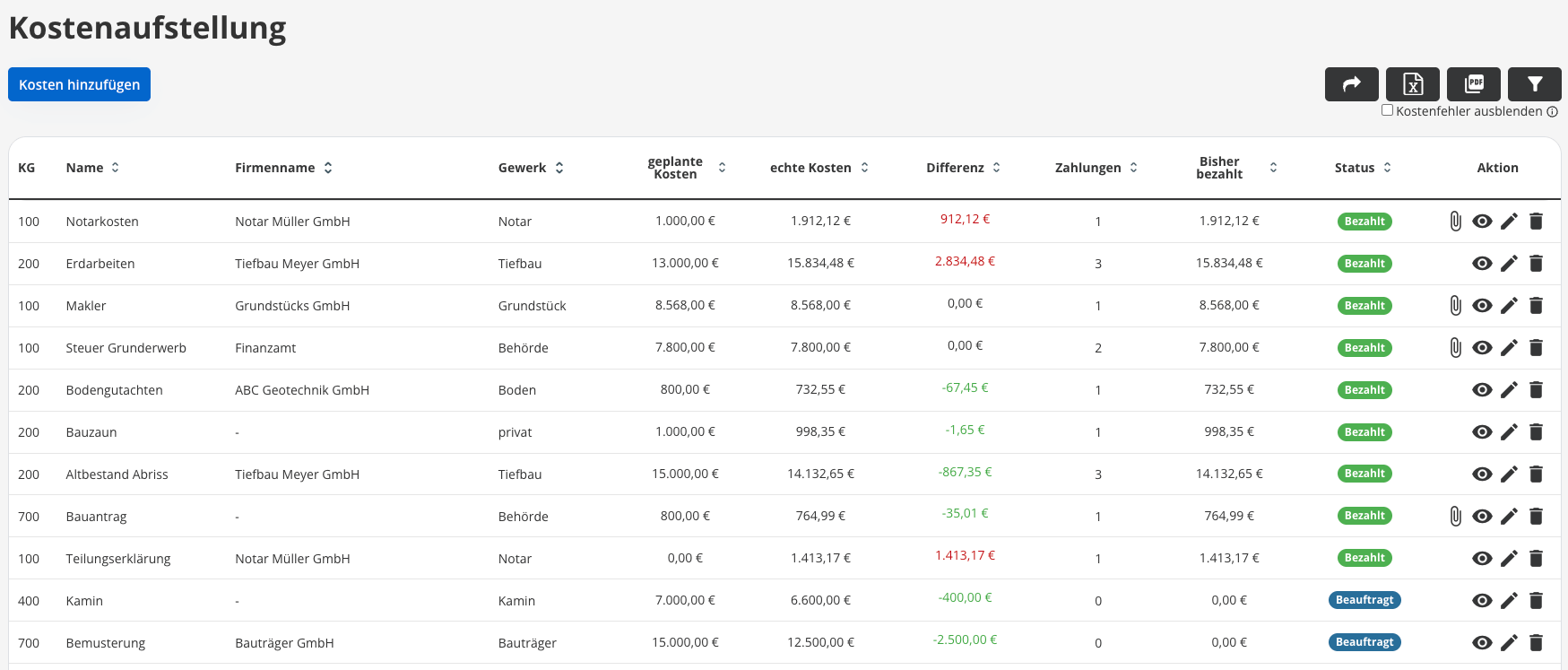
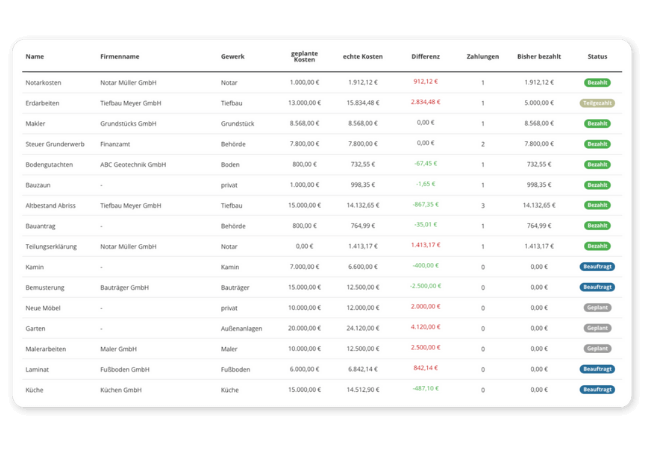
With the POCASIO construction cost breakdown, you can see at any time which expenses have already been incurred and which are still pending. This allows you to take corrective action in a timely manner before costly additional funding becomes necessary.



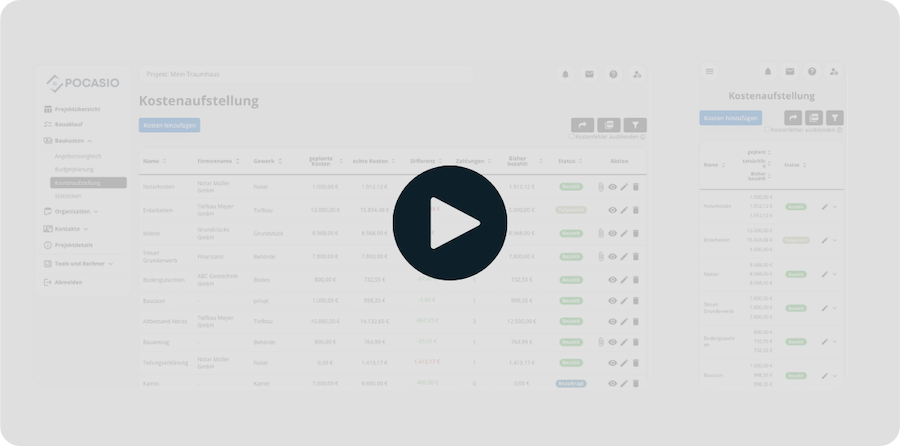
That’s how quickly construction costs can spiral out of control—without you even noticing!
By the time the sixth or seventh partial invoice arrives, many project owners have completely lost track of things. They no longer know exactly what has already been paid, which invoices are still pending, and how much the outstanding balances actually amount to. This makes it nearly impossible to react in time—for example, to scale back the scope of work or plan for tasks they’ll do themselves—before costs get out of hand.
Nearly 400 homeowners from Germany who have already completed their construction projects participated in our survey. The result: Budget overruns and costly additional financing are not the exception—they’re the rule! If you have clear figures from the start, you can avoid these pitfalls.

69.3% exceed their planned budget
Most homeowners underestimate additional costs such as change orders, special requests, or incidental construction costs, and end up significantly exceeding their original budget.
One in five has to take out an expensive loan to cover additional costs
Inadequate planning, a lack of oversight, and rising costs often result in the need to increase loan amounts retroactively—with high interest rates and an additional financial burden.
average additional cost of 57,600 €
Our survey shows that, on average, additional costs amount to the price of a mid-range car—a sum that catches many homeowners off guard and, in the worst-case scenario, brings the project to a standstill.The construction cost breakdown that calculates—not just adds up—the costs
When building a house, it’s crucial to recognize early on when costs are getting out of hand or when the scope of work needs to be adjusted. Only with a clear overview can you react in time to revise the scope of work, eliminate certain items, or take on specific tasks yourself. POCASIO gives you this transparency and shows you where you stand financially at all times. This way, you stay in control before the third deviation leads to major problems.
Identify additional costs before they arise
What is my house really worth, and where do I stand right now? With POCASIO, you can easily enter your estimated costs and later update them with the actual amounts from quotes or invoices. The system immediately shows you where you’re over budget or have even saved money.
So you won’t be caught off guard, but will be prepared.
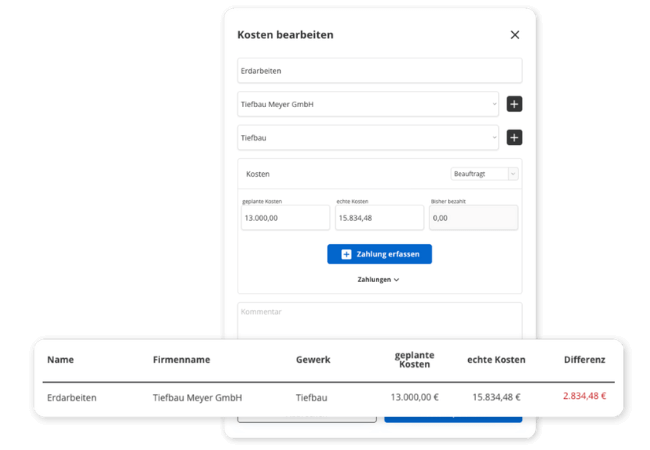

Track (partial) payments and keep track of everything
As soon as the first partial invoices start coming in, things can quickly get confusing. With POCASIO, you can record each payment individually—whether it’s a down payment, installment
, or final invoice. The system does the math for you and shows you exactly how much you’ve already paid and what’s still outstanding.
So that even after the seventh bill, you’ll still know where you stand.
Budget Planning: Which Fund Pays Which Bill
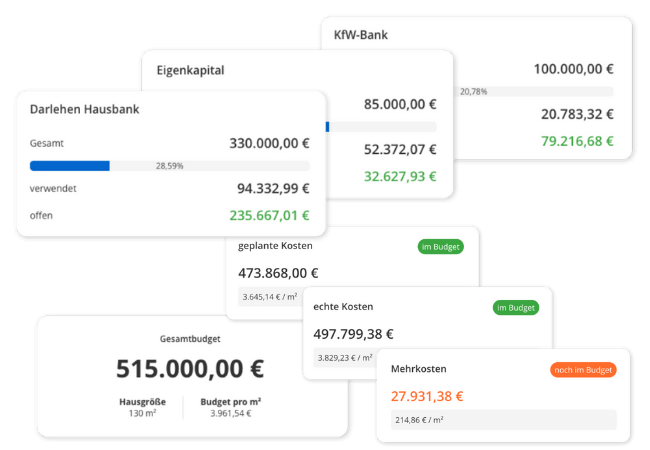
Equity, KfW loans, and bank loans are three separate funds, each with its own disbursement terms. In POCASIO, you set them up individually and assign each payment to the appropriate fund—even splitting it if an invoice is paid from two sources.
The budget plan shows you, for each fund, the total amount available, how much has been used, and how much is still outstanding. Below that is the payment history, including the date, expense entry, company, and funding source. If the financing isn’t finalized yet, you can create placeholders and adjust them later. You don’t have to wait for the bank’s approval to start planning.
So that when you receive your next installment bill, you’ll know which account the payment is coming from.
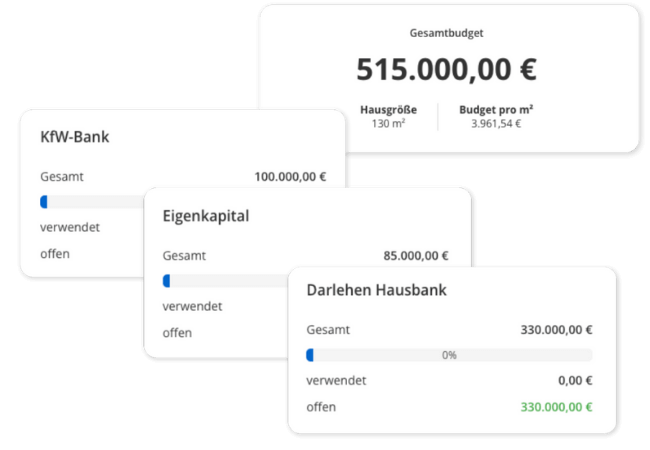

POCASIO also tells you how much your house costs per square meter
The total budget, planned costs, and contract amount are listed side by side, both as absolute figures and per square meter of living space. This gives you a single figure that you can use to compare any quote or estimate without having to do the math yourself.
So you know what you can still afford—before it’s too late.
But that’s not all!
In addition to these features, the construction cost breakdown offers you numerous practical extras that will be a huge help in your day-to-day work. Whether it’s smart payment allocation, attaching documents directly to cost items, or automatic totals and variances—these additional features not only make your construction cost planning more accurate, but also simpler and more efficient.
Trades, Status, and (Optional) DIN 276
Each line item is assigned a company and a trade, along with a status ranging from “planned” to “ordered” to “paid.” The cost groups according to DIN 276 are optional: enable them if the report is going to the bank, and disable them if you’re just keeping track of them for yourself.
Belege direkt an der Kostenposition
Upload invoices directly to the corresponding entry. Everything is stored in one central location—no more searching through email inboxes or folders.Multiple payment methods per invoice
Break down a payment into different sources. POCASIO automatically calculates everything correctly and shows you how much has already been spent from each source.Payment History by Fund
With just one click, you can see how your equity or KfW loan was used—payment by payment, with the date, company, and amount. You can still track it even years later.
Warning when a fund runs out
If a fund is nearing its limit or the total budget is approaching its limit, you’ll see it right away in the overview. That way, you can take action before the next bill goes unpaid.
PDF Export of Your Construction Cost Breakdown
Download your construction cost breakdown as a PDF for the bank, the architect, or simply for your records. Or use the built-in sharing feature.3 Steps to Cost Control
Enter your budget, funding sources (e.g., grants and loans), and initial cost items with planned costs. This will serve as your foundation for clear figures.

3 Steps to Cost Control
Keep track of every invoice and partial payment. POCASIO automatically compares them to your budget and shows you whether you’re over or under budget.
3 Steps to Cost Control
See in real time how much is left and take action before you incur additional costs you can no longer afford. A clear overview helps you avoid costly additional financing!

Build with a structured approach rather than relying on gut feelings
Without a clear overview of costs, builders can easily fall into a cost trap. POCASIO shows you every deviation right from the start—and keeps you safely within budget.
POCASIO in Comparison

e.g. Excel

House Construction Manager
Automatic Comparison of Planned vs. Actual Costs
Early Warning of Additional Costs
Budget planning, including individual funding sources, remaining balances, payments, and partial invoices
Distribute (partial) payments across multiple funds
Optional classification according to DIN 276
Thanks to mobile optimization, you always have all your data with you—even on the construction site
Save documents and invoices directly under the corresponding entry
Share a project with a partner and have shared access
Many other features, such as a construction schedule, construction log, checklists, construction guide, and much more, make it the perfect companion for your construction project
Thousands of users. A tool for every construction project.
Whether it’s a single-family or semi-detached house, an apartment building or residential building, a single apartment, hotel, or restaurant: POCASIO helps to implement construction and renovation projects in a less stressful, clearer, and more cost-effective manner.









Start your Own Construction Project for Free Now.
With POCASIO, you can organize your construction or renovation project in one place and always have all the information in your pocket!
Frequently Asked Questions
Here you’ll find out what other builders, renovators, and project managers wanted to know before getting started with POCASIO.
Yes. POCASIO automatically compares both values. Any discrepancies become immediately apparent, allowing you to take action in a timely manner.
You can add multiple payments to each expense item. Each payment represents a partial payment. POCASIO automatically adds them up and shows you how much has already been paid and how much is still outstanding.
Yes. You can set up an unlimited number of separate funding sources—such as equity, bank loans, or grants—and track their use at any time.
Yes. There is a detailed payment history for each source of funds. This allows you to track at any time how your equity or a specific loan was used.
Just the way you need it. Each line item is assigned a company and a trade, and—if desired—an additional cost group according to DIN 276. You can enable or disable the cost groups: If you’re maintaining the breakdown for your own use, you can omit them and work solely with trades. If you’re submitting it to a bank, an architect, or the tax office, enable them to get a breakdown that will be understood without any follow-up questions.
Yes. As soon as you pay an invoice and assign it to a funding source, POCASIO automatically applies the amount. You can also easily split payments across multiple sources.
Yes. Invoices, quotes, or contracts can be uploaded directly to the corresponding expense item and can be accessed there at any time.
Yes. As soon as actual costs exceed the planned costs—or even the planned budget—you’ll automatically receive a warning.
Yes. With just one click, you can export the content as a clear, easy-to-read PDF. That way, you’ll always have your data at your fingertips—to save, print, or share with others.
POCASIO offers a free basic version that works great during the planning phase. Once your construction phase begins and you want to track payments, for example, you can do so with the Plus license. The good news is that, thanks to the free license, you’ll know by then whether POCASIO is the right solution to support you through the end of your project.
POCASIO Plus is available as a monthly or annual subscription. Alternatively, you can purchase a one-time license if you don’t want to make recurring subscription payments. You can find the current prices on our Pricing page.
Then simply try it out for free! And if it’s not for you, you can delete your account at any time via your profile settings. And perhaps you could even let us know what you felt was missing, so that we can make POCASIO even better!